Public Steam disclosure research27,951 disclosures tracked
Where do games disclose AI use?
Search developers’ Steam disclosures, compare classified AI use across
games, and follow recorded changes.
This index adds cross-game classifications and statistics to
statements published on individual store pages.
Groups reflect automatic analysis of public disclosures; mature records are excluded. These counts do not measure AI use across all of Steam.
Missing or unclear statements cannot establish whether a game uses AI.
Manga Archive Translator can use local AI translation models to translate text from manga archive files provided by the user. It does not generate original artwork, audio, characters, story content, or executable code.
Hagicode is a software tool for code development that interfaces with third-party CLI tools. Accordingly, it invokes third-party CLI tools for content generation. These CLI tools, including Claude Code, Codex, Gemini CLI and others, are installed and used by users on their own computers independently.
Users utilizing these CLI tools are generally professional developers. Hagicode does not invoke any third-party AI generation services other than the aforementioned CLI tools. It merely acts as a caller to coordinate and display outputs returned by the CLI tools.
Therefore, Hagicode shall not be liable for the generated results and content. Hagicode is not the actual generator and implementer, but only a caller.
Game development was accelerated through use of AI code assistants to help create and test the software code.
Language translations were provided by AI.
Some store trailer audio, including voice and music, was generated or assisted by generative AI. The application itself does not include AI-generated assets and does not generate AI content during use.
Wallpaper Animator uses generative AI. An in-app AI assistant creates wallpapers from your descriptions, edits them, and animates them into looping videos, using third-party AI services and our own servers.
Connects to 3rd-Party Service for AI Content Generation: OpenAI
Divooka is primarily handcrafted, next-generation software and does not rely on AI-generated content as part of the user-facing experience.
Generative AI is used selectively within the development process in the following areas:
- Refinement of marketing materials (written content, visual compositions)
- Research and prototyping during R&D phases
- Limited graphical asset generation (e.g., icons, non-core UI elements)
- Localization support (translation and adaptation of text)
No AI-generated content is directly shipped as part of the core software experience.
As a programming environment, Divooka provides APIs for interfacing with external generative AI services and locally hosted models. Through these APIs, users may generate content at runtime, including:
- Text (e.g., scripts, dialogue, documentation)
- Code (user-authored or AI-assisted program logic)
- Visual assets (e.g., images, textures)
- Other data depending on the connected model or service
Divooka itself does not require or depend on AI-generated content to function. All generation is user-initiated and controlled.
Connects to 3rd-Party Service for AI Content Generation: OpenAI, Grok, Gemini, DeepSeek, NVIDIA NIM
This app uses live generative AI to create dynamic in-game content such as dialogue and voice output. AI features are processed through developer-managed servers. Players are not required to provide API keys or maintain third-party accounts.
Connects to 3rd-Party Service for AI Content Generation: Google Gemini (Google Generative AI)
This AI code helper uses generative AI technology to assist developers in code generation, editing, and debugging. All generated content is for reference only, and users are responsible for compliance with relevant licenses and laws.
This software employs several speech synthesis models trained on open-source large-scale models, whose training datasets are curated to intentionally exclude extreme or inappropriate content. We have built a generative synthesis system based on these models; however, all generated speech content is entirely determined by the user. Therefore, our terms of use explicitly stipulate that this software must be used in a lawful and ethical manner.
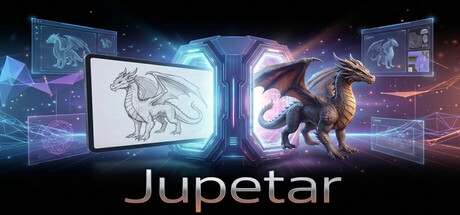
Jupetar is a dedicated 2D-to-3D asset generation engine powered entirely by generative artificial intelligence. The software utilizes localized, open-weights AI networks (including diffusion and 3D generation models) running directly on the user's hardware to convert user-provided 2D concept art and images into 3D meshes and textures. All AI processing is performed offline on your local GPU. Jupetar does not connect to external cloud generation services, and your personal assets, images, and prompts are never uploaded, collected, or used to train external AI models.
Some reference images were originally AI-generated.
The final pixel art was manually created, edited, and upscaled using Ref2Pixel.
No AI-generated assets are directly included in the product.
Movavi Video Suite comes packed with smart AI tools that make video editing even easier:
-Automatic subtitle creation saves loads of time by generating captions for you in almost any language.
-The AI denoiser automatically cleans up background noise in your audio, so you get clear sound without any hassle.
-If you need to remove background, AI does it in just a few clicks – no green screen required!
-With motion tracking, you can easily follow objects or people through your footage, making it a breeze to add text, effects, or animations that stay locked onto your moving subject.
-AI Upscaling. Use the program’s AI to up the resolution of grainy shots by 4 or even 8 times. Make every detail count!
Movavi Video Editor comes packed with smart AI tools that make video editing even easier:
-Automatic subtitle creation saves loads of time by generating captions for you in almost any language.
-The AI denoiser automatically cleans up background noise in your audio, so you get clear sound without any hassle.
-If you need to remove background, AI does it in just a few clicks – no green screen required!
-With motion tracking, you can easily follow objects or people through your footage, making it a breeze to add text, effects, or animations that stay locked onto your moving subject.
Diagram Awesome includes an AI image generator that enables users to create images for their diagrams. Users are solely responsible for ensuring that generated content complies with Steam guidelines and copyright laws.
This app uses AI model to generate anime-like artworks, to help artists and players make their ideas and original characters or pets into anime just from describing them.
This application uses on-device Generative AI to translate text from your screen or system audio in real time. All translations are generated locally on your own computer. The application is a tool for translating existing text and does not generate new original content (e.g., stories, characters, or images). No cloud service or third-party AI account is required.
AI-Powered Texture Upscaling:
This application utilizes Artificial Intelligence (AI) to enhance the visual quality of textures and other image assets. Our AI upscaling feature allows users to generate higher-resolution versions of their provided images, resulting in improved detail and clarity for use in their projects. This helps artists and developers achieve a polished look for their game content.
I use the service to generate artificial intelligence voices for characters. The voice generation process does not occur in real-time, but rather beforehand, allowing me to test and evaluate the content before using it in the game. Additionally, I implement appropriate preventive measures to ensure that the generated content is suitable and compliant with legal requirements and Steam standards.
only pre-trained models are used for the gif background removal tool and for the movement of the models if mouse tracking is activated, at no time are the models rendered when running,
Movavi Video Suite comes packed with smart AI tools that make video editing even easier:
-Automatic subtitle creation saves loads of time by generating captions for you in almost any language.
-The AI denoiser automatically cleans up background noise in your audio, so you get clear sound without any hassle.
-If you need to remove background, AI does it in just a few clicks – no green screen required!
-With motion tracking, you can easily follow objects or people through your footage, making it a breeze to add text, effects, or animations that stay locked onto your moving subject.
-AI Upscaling. Use the program’s AI to up the resolution of grainy shots by 4 or even 8 times. Make every detail count!
Movavi Video Editor comes packed with smart AI tools that make video editing even easier:
-Automatic subtitle creation saves loads of time by generating captions for you in almost any language.
-The AI denoiser automatically cleans up background noise in your audio, so you get clear sound without any hassle.
-If you need to remove background, AI does it in just a few clicks – no green screen required!
-With motion tracking, you can easily follow objects or people through your footage, making it a breeze to add text, effects, or animations that stay locked onto your moving subject.
FluidFrames uses an AI that can multiply the FPS in a video, this is done by taking 2 frames of a video and calculating the intermediate frame. In a manner identical to FSR 3 FG or DLSS FG.
Players can create textures using text prompts, and apply those textures to virtual clothing templates.
Our team uses generative AI tools to help develop some in game assets.
Connects to 3rd-Party Service for AI Content Generation: Replicate.ai
I use the service to generate artificial intelligence voices for characters. The voice generation process does not occur in real-time, but rather beforehand, allowing me to test and evaluate the content before using it in the game. Additionally, I implement appropriate preventive measures to ensure that the generated content is suitable and compliant with legal requirements and Steam standards.
Nyanco Viewer is designed to provide a rapid and user-friendly image viewing experience on Steam, specifically tailored for manga, photographs, and various forms of artwork, supporting an array of formats. It includes AI-generated content, used merely as examples to showcase the app's capabilities. We appreciate your consideration of Nyanco Viewer as your preferred application for discovering and appreciating visual content on Steam.
The application uses AI for editing. Specifically:
* AI to demux sounds to parts
* AI to create karaoke sound effects
* AI to transcribe text from speech
* AI to create speech from text
* AI to separate speech
* AI to enhance speech
* AI to reduce music noise
* AI to upscale images
* AI to stabilize videos
* AI to resize images
* AI for content-aware erasing
* AI for image object detection
* AI for face restoration
* AI for file compression
All AI models are MIT-licensed and no image or video is automatically generated.
The app processes the frames from the video and uses AI to predict how much movement each pixel has along the X and Y axes. The AI model then generates optical flow data for both axes, which are just floating-point numbers for X and Y.
With this information, traditional methods are used to create a new frame by combining parts of the two original frames. The AI doesn't generate new RGB data; it only uses the RGB data from the original frames.